
How to display PHP error in Browser By Using IIS7 Settings

Dear friends
If you are looking for display the PHP error in the browser by using IIS 7 version the please check the

Development Machine Radio Button Under » Configuration Error Reporting section

How you access it
----------------------------------
Note this article is supported if you already installed the php through Microsoft Web plateform Installer
I recommended to install your PHP through it because its easy and highly effective for advance progamming mode by using windows platform 
1) Open you IIS
2) Click on the Site Name under the Sites
3) There is a PHP Manager Under your site settings
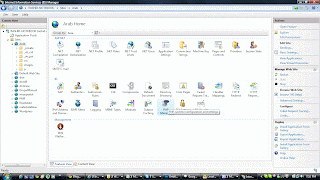
4) Click on the Configure error reporting Link Under PHP settings

5) Select the Developer machine


Hope it will help you to as well

Regards
Rashid Imran Bilgrami
CEO Best visualization
http://www.bestvisualization.com 

Comments

Popular posts from this blog

How to convert and crack windows server 2012 from Evaluation to Full

Dear All This is a way how you Convert Evalution to Full Step1: Open CMD and run following command DISM /online /Get-CurrentEdition <edition ID> is like ServerStandard with out Eval Step 2: DISM /online /Set-Edition:<edition ID> /ProductKey:XXXXX-XXXXX-XXXXX-XXXXX-XXXXX /AcceptEula WINDOWS SERVER 2012 Serial Key Windows Server 2012 DataCenter: 48HP8-DN98B-MYWDG-T2DCC-8W83P Datacenter: Y4TGP-NPTV9-HTC2H-7MGQ3-DV4TW Standard: XC9B7-NBPP2-83J2H-RHMBY-92BT4 Standard R2: DBGBW-NPF86-BJVTX-K3WKJ-MTB6V Server Essentials: K2XGM-NMBT3-2R6Q8-WF2FK-P36R2 For Standard R2 here is a command For R2 its like that DISM /online /Set-Edition:ServerStandard /ProductKey:DBGBW-NPF86-BJVTX-K3WKJ-MTB6V /AcceptEula Regards

SugarCRM Footer Logo Remove & SugerCRM violation Message Remove

Hi Reader, Let us discuss about how to remove the SugarCRM Footer logo.. You all are aware of the power of the SugarCRM Tool and also must be very eager to remove the footer in order to make it look more professional. So below mentioned are some tricks for removing the footer from SugarCRM Community edition. 1)  O pen-modules/Administration/ updater_utils.php Add-exit() ; in between   function check_now()   and   return . any where By doing this u can remove 'powered by sugar crm' footer logo. 2) Go to  modules/Trackers/Tracker.php, line 128, in the 'logPage' function. Drop the 'echo' statement. 3) Now to root(Sugarfolder)\include\mvc\view\sugarview.php and modify the line array(show header => true, show subpanel => true...........and so on) and make the changes to showfooter=>true to  showfooter=>false Now how you remove the violation  Go to include /utils/ mvc_utils.php and remove the line or code b...

DNN 7 Won't go into edit mode or not working with control bar

Dear All, Today when i install the DNN 7 then i found and issue in edit mode after installation. The problem is when i go to edit mode the page refresh with out enabling the edit mode, after a short research on Google i found the solution. I hppe it save your time 1. backup your web.config 2. Open your web.config in a text editor 3. within the web.config file, find the <system.webserver><modules> section. 4.  If the <modules> section says <modules runAllManagedModulesForAllRequests="false"> change it to <modules runAllManagedModulesForAllRequests="true"> OR  if it just says <modules>, change it to <modules runAllManagedModulesForAllRequests="true"> 5. Save the config file. 6. Retry by refreshing the page and trying again.  You can also test this out by trying to a do a journal post (which also uses the services framework in an authenticated way. If some how its will not work then, you must chang...